Showing posts with label Tips Facebook. Show all posts

29/05/2013

Make Single Name Account On Facebook

 Facebook Now biggest social media site with millions of daily users but the amazing think about facebook is all facebook tricks and facts like Facebook chat code tricks or changing Facebook theme tricks but their are many spam which may you attack your account protection but we provide only safest way to enjoy Facebook. If have doubt related to security so lets you to compromise your account must read my opinion about make account secure and increase account protection.
Now here new safest tricks to make single Facebook account. It is not possible to Make account on Facebook without Last name because it is against the policies of Facebook. But if you want to make your Facebook profile with First name without using last name then simply follow my given steps.
Note:- After few months of successful working of this trick. now few days back Facebook start blocking this Ip address for many countries and places. So i don't guaranty about it, So please try it i hope its may work for your place.

This trick is working for Mozilla Firefox so try it on Mozilla.
Firstly Change your Browser Proxy Manually use one of the proxy from below given.
HTTP Proxy :- 
202.150.135.74
103.247.16.97
222.124.3.82
202.152.156.210
118.99.67.186
121.100.25.40
202.43.188.199
118.97.130.10
PORT :  8080
Then Save Your Settings.
Now Open your Facebook Account  Name Settings.
Change your language from English (us) to Bahasa Indonesia
Then  Simply remove Your Last Name And Save it.
Now Your Facebook Account is only with First Name Without Last Name.
 
After Completing all steps remove Manual Proxy and select  use system proxy settings and change change your language back to English (us)

Important Note:- Firstly Open your Facebook account settings then change proxy because sometime after changing proxy their will be error in log in account
READ MORE - Make Single Name Account On Facebook

16/02/2012

Disable Facebook Timeline 100% work

If you have got Facebook Timeline and want to change back to viewing the old style profile pages, or if you haven't got Timeline yet, but just want to view your friend's Timeline pages in the old style profile format, this guide is for you.
Currently, if you visit a Facebook Timeline page, with a browser that identifies itself as "Internet Explorer 7", you will be shown the old style profile page for that person, instead of their Timeline page. This is because Facebook haven't yet created a version of Timeline that works with IE7, and if their level of support for IE6 is anything to go by (no chat, no ticker and no timeline), they probably never will.
When you visit a website, your web browser sends it an identification code, known as the "User Agent", which lets the site know what web browser you are using. This method for disabling timeline works by changing your current browser's "User Agent" to IE7 and tricking Facebook into showing you the old style profile pages. One problem with this method, is some page formatting errors occur on profile pages/fan pages and group pages, in particular theres a big gap between the heading of the page and the actual content. You can fix this by installing the latest version of FB Purity, the web browser extension that cleans up your facebook experience.

Instructions for Disabling Facebook Timeline

The method for setting the User Agent to IE7 for the following browsers are listed below : Chrome, Firefox, Safari, Opera and Internet Explorer. 
Its easy to switch Firefox's User Agent to IE7, the steps are as follows
  1. Install the "User Agent Switcher" Extension from addons.mozilla.org/firefox/addon/user-agent-switcher/
  2. Go to Firefox's "Tools/User Agent Switcher/Internet Explorer" menu and select "Internet Explorer 7"

  3. Install the F.B. Purity browser extension, as it will fix most of the display glitches that occur when you switch the browser's User Agent to IE7, and it also has a lot of other cool and useful features for customising Facebook.
  4. Now go and view a Timeline page, it will be displayed in the old Profile format. BTW If you want to at any point switch the User Agent back to normal, just set the User Agent to "Default User Agent" or else just disable the "User Agent Switcher" extension.   
  5. For other browser go here
Other options use Timeline Remove is currently available for Firefox and Google Chrome, with versions for Internet Explorer and Safari in the works. After installing it, the following warning message appeared when we browsed Facebook.

READ MORE - Disable Facebook Timeline 100% work

14/02/2012

cool valentine texts for facebook

Here some cool texts  for your facebook 
╔╗ ╔╗╔═╦╦╦═╗╔╗╔╗═╦╦╗
║║ ║╚╣║║║║╩╣╚╗╔╣║║║║
╚╝ ╚═╩═╩═╩═╝═╚╝╚═╩═╝

░░▄███▄███▄
░░█████████
░░▀█████▀
░░▀█▀
  
┈╱▔▔▔▔▔▔▔▔╲┈♥┈♥┈
╱▔▔▔▔▔▔▔▔╲╱▏┈♥┈
▏┳╱╭╮┓┏┏┓▕╱▔▔╲┈
▏┃╱┃┃┃┃┣▏▕▔▔╲╱▏
▏┻┛╰╯╰╯┗┛▕▕▉▕╱╲
▇▇▇▇▇▇▇▇▇▇▔▔▔╲▕
▇▇╱▔╲▇▇▇▇▇╱▔╲▕╱
┈┈╲▂╱┈┈┈┈┈╲▂╱▔┈
 ___◕◕◕◕◕
_◕◕◕.....◕◕◕
◕◕◕........◕◕◕◕◕◕
◕◕◕.........◕◕◕...◕◕◕
_◕◕◕.........◕◕.....◕◕◕
__◕◕◕.................◕◕◕
____◕◕◕.............◕◕◕
______◕◕◕.....◕◕◕
_______◕◕◕◕
_______◕◕
 ──────────────────────
───────█▀▀█─█▀▀█──────
──────▄▀▀▀▀▄▀▀▀▀▄─────
──────▀▄─▀▄▄▄▀─▄▀─────
────────▀▄───▄▀───────
──────────▀▄▀─────────
──────────────────────
─────▄█▀█▄──▄███▄────❤
────▐█░██████████▌────
─────██▒█████████─────
──────▀████████▀──────
─────────▀██▀─────────
──────────────────────
▀██▀─▄███▄─▀██─██▀██▀▀█
─██─███─███─██─██─██▄█
─██─▀██▄██▀─▀█▄█▀─██▀█
▄██▄▄█▀▀▀─────▀──▄██▄▄█

 ............(¯`•´¯)
.................`♥•.,(¯`•´¯)
.................(¯`•´¯).♥.•
.................`•♥.,.•´
.............(¯`•´¯)
.................`♥•.,(¯`•´¯)
.................(¯`•´¯).♥.•
..................`•♥.,.•´
 ______$¦$¦$¦$ ____ $¦$¦$¦$
____$¦$_____$$__$$_____$¦$
___$¦$________$$________$¦$
__ $¦$___________________$¦$
___$¦$__________________$¦$
_(¯`.´¯)$¦$__________$¦$(¯`.´¯)
(¯≻ ✦ ≺¯)$¦$______$¦$(¯≻ ✦ ≺¯)
_(_.^._)____$¦$__$¦$_ (_.^._)
_____(¯`.´¯) __$¦$__ (¯`.´¯)
___ (¯≻ ✦ ≺¯) _ $_ (¯≻ ✦ ≺¯)
_____(_.^._) (¯`.´¯)_(_.^._)
__________(¯≻ ✦ ≺¯)
_____(¯`.´¯) (_.^._) (¯`.´¯)
___ (¯≻ ✦ ≺¯) ____(¯≻ ✦ ≺¯)
_____(_.^._) ______ (_.^._)

 Copy and paste text above to your status or your friends wall


READ MORE - cool valentine texts for facebook

24/01/2012

Login Multiple Facebook Accounts On Firefox Without Add-ons

If you have more than one Facebook account, you might have tried lo login into them at same time. Yes, I am talking about way to login multiple Facebook accounts simultaneously. If you are using Mozilla Firefox, you can easily do it.

.

Login Multiple Facebook Accounts On Firefox
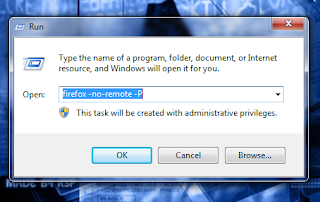
STEP 1: On Windows click Start > Run then type firefox -no-remote -P
STEP 2: Create an extra profile by using the Create Profile wizard, and make sure that each profile has a distinct name. You’ll also want to leave the “Don’t ask at startup” box checked.
STEP 3: Select your profile then click start ..to login multiple select another profile

Now you’re ready to launch Firefox with the -no-remote switch. The trick is that you need to select your second profile when you launch your second instance.
So start Firefox as normal, then launch a second browser.

Happy Facebooking!
READ MORE - Login Multiple Facebook Accounts On Firefox Without Add-ons

17/01/2012

Rainbow Text on Facebook Chat

Maybe you are not sure about this..because you may have never tried or even seen..:)
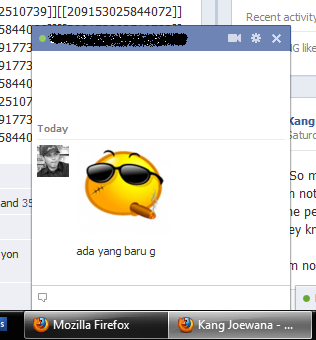
what if you look at the picture below, do you still not convinced


 and this one more


if you are interested and want to try it..just copy and paste code below on your chat box

[[209152865844088]] [[209152855844089]] [[209152852510756]] [[209152859177422]] [[209152862510755]] [[209152949177413]]
[[209152952510746]] [[209152959177412]] [[209152945844080]] [[209152955844079]] [[209153019177406]] [[209153012510740]]
[[209153015844073]] [[209153022510739]] [[209153025844072]] [[209153089177399]] [[209153085844066]] [[209153092510732]]
[[209153095844065]] [[209153099177398]] [[209153215844053]] [[209153212510720]] [[209153219177386]] [[209153222510719]]
[[209153209177387]] [[209153285844046]] [[209153279177380]] [[209153275844047]] [[209153282510713]] [[209153289177379]]
[[209153345844040]] [[209153349177373]] [[209153352510706]] [[209153342510707]] [[209153355844039]] [[209153419177366]]
 
for RAINBOW text you can visit generator HERE


READ MORE - Rainbow Text on Facebook Chat

11/01/2012

Beautiful Generator Cover Timeline

Wow awesome tool from Pic Scatter  generator that can make your timeline cover from your photo album on facebookPic Scatter offers the ability to take one of your Facebook photo albums, and turn all of the images inside of it into a beautiful collage of multi-sized images, scrap-booked together. This collage is then formed into a single image, and is uploaded as your new Cover photo.

How to use it


First Login with your facebook


Then select the image that will be generated from Friend,Album, Likes, or Shufle
you can choose a theme .. you can see an example by moving the cursor to the left of the filter
please fill in the title at the column that has been provided


Download cover and upload to your cover..:)
This example of that I made 


Thank for Pic Scatter  good job 
As to the privacy of your Facebook data (always a concern these days), Pic Scatter’s site says they’ll perform all photo collage-ing actions on your browser, without the need to save data on their servers.
Of course, you could perform this action yourself, if you have mad PhotoShop skills and time on your hands. But the day is short enough and you don't have the time to spend looking cool anymore, right?
go go go :)
READ MORE - Beautiful Generator Cover Timeline

30/12/2010

How to make facebook profile hack

I found out through Mashable , forum balikita and Reface that there is a new trend on Facebook's profiles. Looks like people are getting very creative with the new look Facebook has provided. So I've been gathering ideas to come up with one for my Facebook Profile.


In the meantime I thought I would share a few of my favorite ones. 


The following is how to make it
1. Prepare the first image that will be used for your profile
2. Create an image with width 180px (height is up), then upload [upload it] and make the Profile Pictures 
3. Create 5 images with width 68px heigth 97px , upload it anywhere it's up
4. Last ... mark the 5 thumbnails [small image] it with your name, so that everything appears on the profile pages 

please create your liking..happy tweaking.. 
READ MORE - How to make facebook profile hack

01/11/2010

Tips Logout Facebook Dari Jarak Jauh

Fitur baru dari facebook seputar keamanan akun facebook anda adalah dimana anda dapat melakukan remote logout dari tempat lain ketika anda lupa logout atau keluar dari akun facebook anda saat anda online di tempat lain.
Kemanan ini cukup berguna jika saja anda lupa logout saat anda menggunakan komputer di warnet. Anda juga bisa mendapatkan pemberitahuan jika akun anda dibuka oleh orang di tempat lain tanpa sepengetahuan anda.

Untuk menggunakan fitur facebook ini cukup mudah, anda tinggal masuk ke akun facebook anda dan pilih Pengaturan akun / Account settings. Dibagian bawah anda akan melihat Keamanan Akun / Account Security klik pada menu ganti / change.


Untuk Mendapatkan pemberitahuan lewat sms atau email jika sesorang membuka facebook anda tinggal pilih opsi Pemberitahuan Masuk ke Aktif / Login Notifications ke On.

 oke segitu aja tipsnya smoga berguna ...smokethumbsup
READ MORE - Tips Logout Facebook Dari Jarak Jauh

29/10/2010

Facebook Blokir Link Berakhiran Co.Cc

Pernah tidak mengalami masalah ini?  (lihat gambar). Ini terjadi ketika saya mengirim sebuah tautan (link) dengan akhiran Co.Cc. Belakangan ini diketahui bahwa facebook telah memblokir akses berbagi link/tautan untuk semua konten yang berakhiran Co.Cc. Menurut facebook konten yang berakhiran Co.Cc mengandung unsur Kasar, Penghinaan atau SPAM, sehingga facebook tidak mengizinkan lagi berbagi tautan atas konten tersebut. Tapi ternyata bukan hanya berbagi tautan saja yang tidak dapat dilakukan untuk konten Co.Cc di dinding facebook, konten facebook (tombol share) yang dipasang di blog/web pun dengan domain yang berakhiran Co.Cc juga ikut di blokir. Tombol ini tidak dapat berfungsi lagi, karena semua akses yang berkaitan dengan konten Co.Cc telah di blokir sepenuhnya oleh facebook.


Bagaimana Konten Co.Cc ini bisa di blokir?
Menurut saya, ada beberapa alasan mengapa facebook memblokir konten Co.Cc ini:
  • Pertama: Banyak pengguna facebook yang melaporkan tautan yang berasal dari domain yang berakhiran Co.Cc adalah SPAM. Kebiasaan kita sering mengirim pesan ataupun menulis di dinding orang lain berupa link dan sementara mereka tidak menginginkannya, membuat orang lain merasa terganggu dan akhirnya melaporkan bahwa link tersebut mengandung SPAM.
  • Kedua: Saya pernah membaca sebuah artikel situs luar, yang menyatakan domain Co.Cc sangat rentan disusupi oleh Malware. Ini juga yang menjadi alasan mengapa saya mengganti domain saya dari Co.Cc ke COM, seperti pada postingan saya terdahulu. Kemungkinan untuk alasan keamanan inilah mengapa facebook memblokir konten tersebut.

Bagaimana cara untuk membuka blokir Co.Cc agar dapat digunakan kembali?

Untuk kasus seperti ini saya sendiri belum pernah mencobanya, karena yang di blokir adalah konten bukan akses untuk login. Namun facebook juga menawarkan bantuan agar konten yang berkaitan dengan Co.Cc ini dapat di buka kembali. Caranya:
  • Coba anda tuliskan tautan yang memiliki akhiran Co.Cc di dinding facebook anda. Ketika anda post maka akan muncul pesan seperti gambar 1 diatas. Kemudian pilih Beri tahu kami.
  • Selanjutnya akan muncul halaman “Saya tidak bisa menambahkan Konten” seperti gambar 2 di bawah ini.
  • Isikan sesuai dengan yang diminta: konten (co.cc), URL (tautan yang tadi anda bagikan), alasan (buat alasan anda sehingga facebook bersedia membuka blokir untuk konten ini). Gunakan bahasa Inggris untuk alasan tersebut. Kemudian masukkan spam filter (capcha) dengan benar dan terakhir tekan tombol KIRIM.
Namun cara ini tidak menjamin apakah facebook bersedia membuka kembali blokir konten Co.Cc ini. Saya sendiri udah melakukan langkah ini, namun belum menerima balasan apapun dari facebook. Tapi inilah upaya yang bisa kita lakukan saat ini dan semuanya kembali lagi ke pihak facebook sendiri, apakah bersedia untuk membuka blokir konten ini atau tidak.
Atau jika anda tetap ingin blog anda bisa ditautkan ke facebook ya kembalikan settingan blog anda ke domain asal..hehehe
Oke..itu saja tipsnya semoga bermanfaat.
READ MORE - Facebook Blokir Link Berakhiran Co.Cc

26/10/2010

Find out who deleted u on Facebook /Rejected ur Friend request

credit : google
           thefacebookforum
           Dj*rum Super biggrin

It sounds like a scam.. doesn't it? It's not, this one actually works! It's a Greasemonkey script/extension that works for either Firefox and Chrome.

First of all, what does it do? This extension will place an "Unfriends" button on your Facebook Hompage. With this, you will be able to know who deleted you as a friend on Facebook and your current pendind Friend Requests. You will also get a notification everytime you get deleted or your request gets cancelled.

Second of all, how do you use it? If you use Firefox, read this to know how to install Greasemonkey scripts reader. If you use Google Chrome, skip to the next step (no installation needed) and if you use Safari, AOL, Internet Explorer, Opera, Flock or any other browser, I'm afraid it won't work for you.

Once you've done that, check the Unfriend Finder for Facebook script and click on "Install". That's it!

Then go on Facebook, and you should see something like this.

http://joewana.mobie.in/facebook/baru.JPG


http://joewana.mobie.in/facebook/2.JPG


Thirdly, can your account get in trouble/hacked/phished with this? No, not at all! This script cannot access your personal info, password, e-mail or anything. It also can't access your Wall so you won't get spammed, and it doesn't ask you to post any links to them. The only 'disadvantage' you will get is a "Become a Fan" box at the right when you're on the "Unfriends" window.

It's really well coded and really worth to give it a trym just if you're curious to see who doesn't like you (lol) badgrin
READ MORE - Find out who deleted u on Facebook /Rejected ur Friend request

19/01/2010

Update Status di Facebook Via Blog / Website, atau Via "Terserah Kamu"


bagaimana cara update status di facebook via blog / website,  atau via "terserah kamu". Buat para facebooker mungkin ngak aneh kalo kita nge-update status via mobile web atau biar lebih keliahatan gengsinya gunain via facebook For BlackBerry


Aku akan coba kasi trik agar kita merubah sesuka keinginan kita via apa yang kita gunain. sebagai contoh biar ngak bingung bisa liat gambar diatas dengan tanda merah .

Keren kan, selain itu kisa memberikan pada alamat via tersebut itu ke blog kita. Lumayan kan nambah vistor kali – kali aja ada yang ngeklik. biar ngak memperpanjang mukadimah. cikedot kita mulai

1. Silahkan login ke facebook terlebih dahulu

2. Selanjutnya silahkan ketikkan http://www.facebook.com/developers/ pada browser rekans, maka akan muncul halaman seperti ini


3. Lalu pilih Button atau Menu “Set Up New Application” Maka akan muncul halaman berikut
Update Status di Facebook Via Blog / Website, Via Hati atau Via Terserah Kamu

Isi nama aplikasi yang rekans inginkan, nah dalam kasus ini yang akan kita gunakan sebagai via nya ntar. Jika sudah dibuat nama aplikasinya jangan lupa pilih option “agree” sebelum menekan tombol “Create Aplication”

4. Selanjutnya akan muncul halaman seperti dibawah ini
Update Status di Facebook Via Blog / Website, Via Hati atau Via Terserah Kamu
Karena kita hanya gunakan untuk menggunakan untuk vianya saja. maka silahkan diisikan form diatas alakadarnya, yang aku sarankan hanya untuk menambahkan icon pada aplikasi kita buat. Jika Sudah selesai mengisi  silahkan pilih menu “Back to My Applications” lalu klik Uji Konsol (API, FBML, Feed) yg ada di bawah. Atau jika ingin langsung silahkan buka link disamping ini http://developers.facebook.com/tools.php?connect_wizard

5. Selanjutnya akan terbuka halaman seperti dibawah ini
Update Status di Facebook Via Blog / Website, Via Hati atau Via Terserah Kamu


Pilih tab “facebook Connect Playground“
Update Status di Facebook Via Blog / Website, Via Hati atau Via Terserah Kamu


Pada menu “Markup and Publishing” pilih “Publishing to facebook“
Update Status di Facebook Via Blog / Website, Via Hati atau Via Terserah Kamu

Pastikan Step – step urutan menu diatas beraturan dilakukan. Setelah halaman ini muncul klik button/tombol  “Preview Dialog”  (Lihat gambar) maka akan muncul pop up seperti gambar dibawah


Update Status di Facebook Via Blog / Website, Via Hati atau Via Terserah Kamu

Untuk mencoba apakah via yang kita buat berhasil atau tidak, silahkan coba isi textarea yang telah disiapkan pada pop up diatas. Setelah menekan tombol “publish“, coba anda liat pada halaman profil rekans.
Semoga rekan-rekan  yang mencoba tidak menumukan masalah dalam mencobanya .Dan jugabermanfaat buat smua yang doyan iseng – isengan :) bila ada yang ingin menambahkan triknya silahkan di cument :D
credit: herukurniawan

          tengkunauf
READ MORE - Update Status di Facebook Via Blog / Website, atau Via "Terserah Kamu"

26/09/2009

Facebook Worm Spreading via News Feed

Malware and spam are finding new ways to spread across social media. A few days ago, a nasty Twitter Worm spread through DMs. Today, we have received multiple reports that a new worm is spreading via Facebook wall posts and status updates.
The worm makes a post on walls and updates. The text is as follows:


IF YOU SEE THIS POST AND LINK, DO NOT CLICK IT! It is malware and dangerous to your computer. We have found multiple instances of this worm in Facebook’s Real-time search and through reports from our readers and friends.
IF YOU ARE ALREADY AFFECTED: Immediately change your password, delete all of the malware posts, and post a warning to not visit the link in question. We will update this post as we learn more.

Thank you Drew for the heads-up and for the image.
READ MORE - Facebook Worm Spreading via News Feed

08/08/2009

Upload foto ke facebook lewat hp non BB dan Iphone

Banyak cara untuk upload foto ke facebook dari hp non bb/iphone.
Dari kirim mms trus pake shozu atau lewat pixelpipe tapi kelihatanya ribet.
Menurut saya yang paling mudah adalah lewat fb.brainwares.com karena ga perlu registrasi dan instal lalu klik sana sini..hiks bisa keriting jempolna..
Caranya sbb:
1. Login ke account facebook kamu
2. Setelah itu masuk ke link diatas
Setelah masuk nanti akan ada menu upload baik itu foto atau video..lihat gambar dibawah


Bahkan kita juga bisa menambahkan tag ke dalam foto kita...
Smoga berguna & happy uploading...
READ MORE - Upload foto ke facebook lewat hp non BB dan Iphone

22/07/2009

Automatically Login to Facebook with your Gmail or Yahoo Account

Facebook has come up with a new technique where you can automatically login to it with the account you are currently using.

Now, if you login to any of the services like Google, Yahoo, MySpace, your account in Facebook will automatically login to the currently working account. This means that next time there is NO NEED need to type your login ID and password all over again!
How to set up this privilege:
To set up this privilege between Facebook and Yahoo/Google Accounts, just
Go to Facebook -> Accounts Settings
Click on "Add a new linked account".
This will login automatically to the current service you are using.
Facebook will let you link only one account at a time. For example, if you are sending an email via Gmail to anyone and using Yahoo answers, then it will ask you which account to link and thus, you can link to the respective account.

READ MORE - Automatically Login to Facebook with your Gmail or Yahoo Account

16/07/2009

Atasi Facebook yang kena Hacker disini


Facebook menjadi sesuatu yang sangat populer dan menggoda banyak orang untuk bergabung dalam situs mereka. Baik orang bergabung di Facebook hanya untuk sekedar ingin berteman, bermain, berbisnis, atau bahkan spammer dan hacker perusak (black hacker) yang mencoba membuat perusakan dalam sistem Facebook. Ternyata banyak sekali metode hacking yang dipakai untuk menjebak para pengguna (user) Facebook seperti yang belakangan ini terjadi, yaitu halaman login palsu yang dilakukan FBAction.net(sudah ditutup). Hal ini berdampak pada pengambil alihan akun Facebook menjadi milik sang penjebak (hacker) yang bisa berdampak buruk dan bahkan terjadi pencemaran nama baik sang pemilik akun asli.

Untuk mengatasi masalah Facebook yang di hack, tim Facebook telah memberikan section khusus penanganan akun Facebook yang di hack. Disini pengguna (user) yang telah di hack dapat mengirimkan pesan ke Facebook tentang masalah yang terjadi mulai dari masalah scam, hacking, tips pencegahan hacking dan lainnya.

credit:tips-fb
READ MORE - Atasi Facebook yang kena Hacker disini

15/07/2009

Menghubungkan Facebook dengan Blog/Website -Simplaris Blogcast


Menghubungkan Facebook dengan Blog/Website -Simplaris Blogcast

Ingin artikel blog/website ada di halaman facebook ? Apalagi jika Anda pemilik blog atau web tersebut, dan ingin mempublish artikel agar lebih banyak diketahui teman atau kenalan di Facebook. Caranya mudah dengan menggunakan aplikasi yang bernama "Simplaris Blogcast" di Facebook feed atau artikel terbaru yang ada akan muncul juga pada halaman Facebook sekaligus menjadi nilai tambah untuk mempromosikan blog/website kita
1.Search dengan keyword > simplaris blogcast

2.Dihalaman tentang Simplaris klik tombol > ke aplikasi

3.Silakan masukan alamat feed blog/website
Misalnya untuk blogger:
http://ptcbayar.blogspot.com/feeds/posts/default
(ganti ptcbayar dengan alamat blog Anda)
Sedangkan untuk yang memakai feedburner
http://feeds.feedburner.com/ptcbayar
(ganti ptcbayar dengan alamat yang didaftarkan pada feedburner)

4.Setelah menekan tombol "Lets Blogcast!" akan muncul tampilan tanpa ada isi feed atau artikel, silakan klik link "update"

5.Dan akan muncul seperti ini

Sedangkan untuk konfigurasi lainnya bisa kita lihat di bagian setting

Silakan pilih sesuai keinginan Anda
Untuk menambahkan Simplaris ke halaman Facebook silakan klik kedua tombol "tambahkan ke info" dan "tambahkan ke profil" (pada halaman setting)
Dan terakhir adalah tampilan dari halaman facebook kita yang sudah diisi dengan artikel terbaru dari blog/website lewat aplikasi "Simplaris Blogcast"

Selamat mencoba :)
Credit :tips-fb
READ MORE - Menghubungkan Facebook dengan Blog/Website -Simplaris Blogcast