29/01/2010

Membuat tube anda lebih cepat akses menu ke menunya

(Place the current date in the phone on the 01.05.2005.)
The first two tasks must be created. This is done with the following menu:
>Options
>New entry
>To Do Note
Create the following two tasks in the following order:
1.Task
*Subject: Speed
* Due Date: 04.08.2005
*Priority: High
2.Task
*Subject: Qoukie
*Due Date: 04.08.2005
*Priority: Low
Confirm with OK both To Do Note.The calendar does not close before!
Choose now the task of view on the following menu:
*Options
*Open
Set Speed first, followed by Qoukie menu is done:
*Options
*Mark as done
Under this approach, you can close the calendar and the current date back correctly.
From now should speed the navigation menu significantly increase. Also, the gallery should now be a performance boost get.
After a reboot or reset the phone, the effect is lost.After the switch, everything has to be repeated
comment: gw sih berasa ada banyak banget perbedaanya ke tube gw.
Kredit:kaskus
READ MORE - Membuat tube anda lebih cepat akses menu ke menunya

19/01/2010

Dayhand Keyboard – Alternative text input for Symbian^1

1. Since the first S60 5th Edition (now Symbian^1) smartphone, the 5800 until now, the text input mechanism is something that I really hate.
2. There are 4 options, namely :
- alphanumeric keypad. for one hand usage but it requires a tap on the green tick icon on the top left after typing text… why cant it be placed on other places? such as the bottom of the screen?
- mini qwerty (portrait)
- big qwerty (landscape)
- handwriting recognition
3. The problem for all these text input options (except for the mini QWERTY and HWR) is they are not direct text input. You cant type and see the text entry box at the same time because the text entry window is separated from the text entry box. Why do the typed text box have to be included?
4. And the mini QWERTY is too small to use for someone with big thumb.
5. Using the alphanumeric keypad is even non-productive because there are too many “procedures” to do something as simple as typing a text message, for example.
6. You need to select write new message, the message editor will pop out. Click on the empty area, the alphanumeric text entry window will appear. Then you need to type the text, after that you need to tap the green tick icon on the top left, after that, send SMS. Phew…
7. I hate it and I feel it’s too much… Hence, I need to get an alternative.
8. And I found Dayhand text entry which solves almost all my text entry problems.

Keyboard Menu DayHandInput QWERTY in Portrait

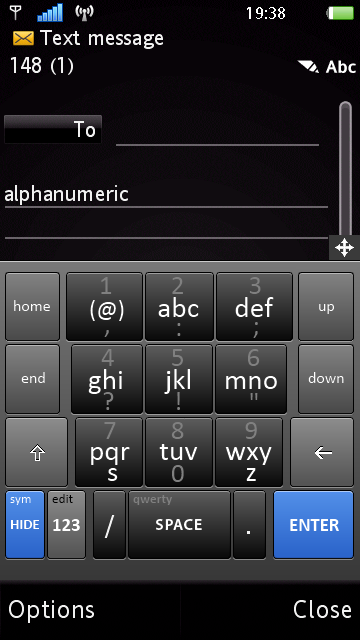
9. It gives me a bigger QWERTY keyboard, with many options including an alphanumeric keypad (that doesn’t eat all the screen’s space), smiley keypad (yesss!!!), an editing keypad and more.

Alphanumeric Keypad DayHandInput numeric in Portrait

10. It even has a predictive mode which can be activated easily.

Tap and drag Tap and drag
11. However, the most interesting in terms of usability and it’s excellent design is the tap and drag to select the alternative alphabet / mode. For example, tap on the letter “d” and drag it up, it will print “+“. Very convenient ;-)
12. Thumb-typing is easy using Dayhand keyboard. I haven’t found any problem using it. Ah… and the landscape qwerty is a joy to use! HUGE alphabet keys!

landscape keyboard
13. I can type faster and more convenient using this alternative method.
14. Please Symbian… Make a better text entry method in future Symbian releases…
15. If you are interested to use Dayhand keyboard, the files are available in our download section. They need to be signed or you need to hack your phone to install them.

note:
* This is a modified version done by Mr. Milk. His words “This is the result of a personal effort to bring something good and free for the community. I’m not the application developer and have no way to change its core functionalities“
Cheers!

credit: i-symbian
          Dayhand
READ MORE - Dayhand Keyboard – Alternative text input for Symbian^1

Update Status di Facebook Via Blog / Website, atau Via "Terserah Kamu"


bagaimana cara update status di facebook via blog / website,  atau via "terserah kamu". Buat para facebooker mungkin ngak aneh kalo kita nge-update status via mobile web atau biar lebih keliahatan gengsinya gunain via facebook For BlackBerry


Aku akan coba kasi trik agar kita merubah sesuka keinginan kita via apa yang kita gunain. sebagai contoh biar ngak bingung bisa liat gambar diatas dengan tanda merah .

Keren kan, selain itu kisa memberikan pada alamat via tersebut itu ke blog kita. Lumayan kan nambah vistor kali – kali aja ada yang ngeklik. biar ngak memperpanjang mukadimah. cikedot kita mulai

1. Silahkan login ke facebook terlebih dahulu

2. Selanjutnya silahkan ketikkan http://www.facebook.com/developers/ pada browser rekans, maka akan muncul halaman seperti ini


3. Lalu pilih Button atau Menu “Set Up New Application” Maka akan muncul halaman berikut
Update Status di Facebook Via Blog / Website, Via Hati atau Via Terserah Kamu

Isi nama aplikasi yang rekans inginkan, nah dalam kasus ini yang akan kita gunakan sebagai via nya ntar. Jika sudah dibuat nama aplikasinya jangan lupa pilih option “agree” sebelum menekan tombol “Create Aplication”

4. Selanjutnya akan muncul halaman seperti dibawah ini
Update Status di Facebook Via Blog / Website, Via Hati atau Via Terserah Kamu
Karena kita hanya gunakan untuk menggunakan untuk vianya saja. maka silahkan diisikan form diatas alakadarnya, yang aku sarankan hanya untuk menambahkan icon pada aplikasi kita buat. Jika Sudah selesai mengisi  silahkan pilih menu “Back to My Applications” lalu klik Uji Konsol (API, FBML, Feed) yg ada di bawah. Atau jika ingin langsung silahkan buka link disamping ini http://developers.facebook.com/tools.php?connect_wizard

5. Selanjutnya akan terbuka halaman seperti dibawah ini
Update Status di Facebook Via Blog / Website, Via Hati atau Via Terserah Kamu


Pilih tab “facebook Connect Playground“
Update Status di Facebook Via Blog / Website, Via Hati atau Via Terserah Kamu


Pada menu “Markup and Publishing” pilih “Publishing to facebook“
Update Status di Facebook Via Blog / Website, Via Hati atau Via Terserah Kamu

Pastikan Step – step urutan menu diatas beraturan dilakukan. Setelah halaman ini muncul klik button/tombol  “Preview Dialog”  (Lihat gambar) maka akan muncul pop up seperti gambar dibawah


Update Status di Facebook Via Blog / Website, Via Hati atau Via Terserah Kamu

Untuk mencoba apakah via yang kita buat berhasil atau tidak, silahkan coba isi textarea yang telah disiapkan pada pop up diatas. Setelah menekan tombol “publish“, coba anda liat pada halaman profil rekans.
Semoga rekan-rekan  yang mencoba tidak menumukan masalah dalam mencobanya .Dan jugabermanfaat buat smua yang doyan iseng – isengan :) bila ada yang ingin menambahkan triknya silahkan di cument :D
credit: herukurniawan

          tengkunauf
READ MORE - Update Status di Facebook Via Blog / Website, atau Via "Terserah Kamu"